It counts the time you're really there
The timer only runs when a tab is actually in front of you and Chrome is focused. Look away or switch tabs and it quietly pauses.
PageTimer counts the time you're actually on a site, not the tabs you left open and forgot about. Set daily limits that actually stick, and keep all of it on your device.
Why PageTimer
Everything you need to understand your habits and build better ones, without handing over your privacy.
The timer only runs when a tab is actually in front of you and Chrome is focused. Look away or switch tabs and it quietly pauses.
Your site names and times are saved right here with chrome.storage and cleared out after 35 days. Nothing ever gets uploaded.
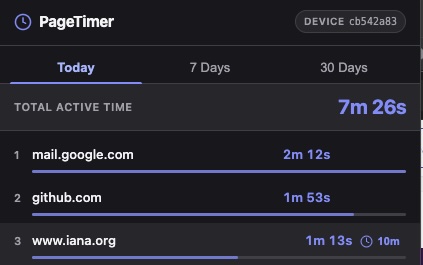
Flip between today, the last 7 days, and the last 30 to see what's really been pulling your attention, ranked by time and how recently you visited.
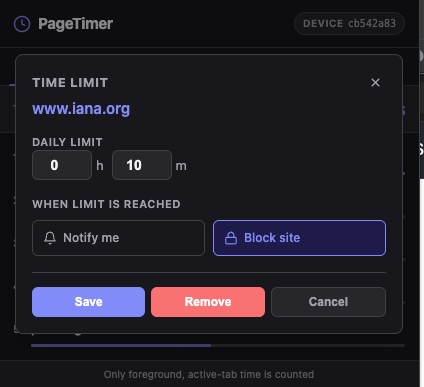
Give any site a daily limit, down to the minute. Then decide what happens when you hit it: a gentle nudge, or a hard block.
Hit your limit and the page freezes with a prompt you can't scroll past. Block it, grab 15 more minutes, or call it a day. Your choice.
Changed your mind? Unblock a site for the rest of the day in a single click, right from the page or the popup.
How it works
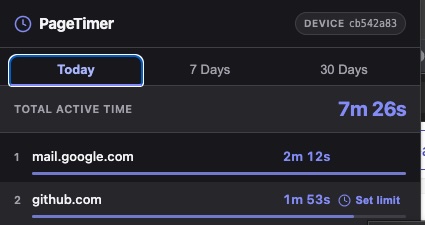
Hover over any site in your list and hit Set limit. Pick how long you'll give yourself, then choose Notify me or Block site for when you get there.
The moment you hit your limit, PageTimer steps in. A full-page prompt makes you stop and choose, instead of mindlessly scrolling on.
Come back to a blocked site and PageTimer asks if you really want back in. Let yourself in for the rest of the day, or close the tab and move on.

PageTimer is private by default. No account, no cloud sync, no data for sale, because your data never leaves your computer in the first place.
chrome.storage and clear themselves out after 35 days.
Add PageTimer and see where your day actually goes. It takes about a minute.
Add to Chrome - Free